A Hugo site in a private GitHub repository, with its theme as a git submodule, deploys to
Cloudflare Pages without going public: give Cloudflare’s GitHub App access to that one repository,
pin HUGO_VERSION, and add the domain. On this site’s first deploy, on 2026-10-11, that took about
50 seconds to vinhdata.pages.dev and 40 more for vinhdata.com.
I ran it through the Cloudflare API. Where the dashboard behaves differently, the text says so and the source is the Cloudflare documentation, not my run.
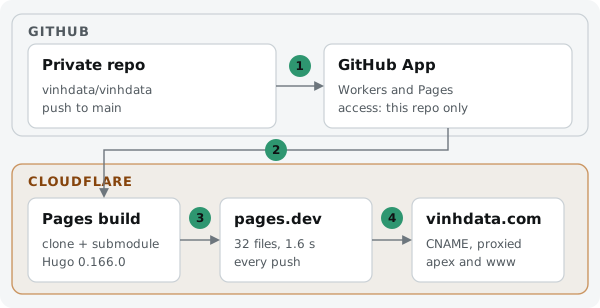
The four hand-offs: the push reaches the GitHub App, the app hands the code to the Pages build,
the build publishes to pages.dev, and the custom domain points there.
What you need#
| Piece | Here |
|---|---|
| Hugo | 0.166.0: Blowfish v3.8.0 declares Hugo 0.163.0 to 0.166.0. I use the extended edition; since Hugo 0.153.2 the standard one satisfies the theme too |
| Theme | Blowfish v3.8.0 as a submodule at themes/blowfish, public upstream |
| Repository | private, on GitHub |
| Domain | a zone already on Cloudflare DNS |
| Output | public/ |
1. Give Cloudflare access to the private repository#
Cloudflare reads your code through its GitHub App, Cloudflare Workers and Pages. A private repository is fine; what matters is that the app may see it.
- First time: the Pages setup in the dashboard installs the app and asks which repositories it may read.
- Already installed for another project: GitHub → your profile Settings → Applications → Installed GitHub Apps → Configure → Repository access, and add the repository. Choose “Only select repositories”: Cloudflare recommends it for organisations, and it fits a personal account too.
When I created the project through the API before adding the repository, the call failed with “The project is linked to a repository that no longer exists”. The repository existed; the app could not see it. Cloudflare’s troubleshooting page lists a different message for this case, “The repository cannot be accessed”, so expect either.
2. Set the build#
| Setting | Value | Why |
|---|---|---|
| Production branch | main | |
| Build command | hugo --minify -b "${HUGO_BASEURL:-$CF_PAGES_URL}" | production uses the real domain, previews their own *.pages.dev URL |
| Output directory | public | Hugo’s default |
HUGO_VERSION | 0.166.0, production and preview | without it the build image installs its own default, older than Blowfish supports |
HUGO_BASEURL | https://vinhdata.com/, production only | canonical links and the sitemap use the domain |
Two things I did not have to configure:
- The submodule. The build cloned the public theme submodule by itself. Cloudflare does not document private submodules; keep the theme public or vendor it into the repository.
- The edition. Setting
HUGO_VERSIONwas enough; the build image installed the extended release on its own.
The build log shows both:
Submodule path 'themes/blowfish': checked out '51a361e068b9975c7f1df8e2bb223db03fe49c2b'
Detected the following tools from environment: hugo@extended_0.166.0
hugo v0.166.0-78400b4de8adc99273d3e674ed6c4d14c3bdf669+extended linux/amd64
 Pages            │ 13
Total in 137 ms
✨ Success! Uploaded 32 files (1.64 sec)
3. Check the first deployment#
In the dashboard, creating the project starts the first build; through the API you start it
yourself (see below). The first build here took about 50 seconds from “queued” to “deploy
success”, most of it cloning. Open <project>.pages.dev and check it returns 200 before touching
the domain.
4. Add the custom domain#
First make sure no old record sends the domain somewhere else. Mine still pointed at GitHub Pages, and a stranger had claimed it: part 2 is that story and its fix.
Then add the apex and www under the project’s Custom domains. In the dashboard, Cloudflare also
writes the DNS records when the zone is in the same account. They end up as:
| Name | Type | Target | Proxy |
|---|---|---|---|
vinhdata.com | CNAME | vinhdata.pages.dev | on |
www | CNAME | vinhdata.pages.dev | on |
A CNAME at the apex works on Cloudflare because it is flattened into addresses. For about 40 seconds the domain answered 522 while Pages activated it; then 200.
Doing it through the API#
Two things the dashboard does for you did not happen through the API, and the token needs two permissions:
| Through the API | What to do |
|---|---|
| no first build after creating the project | start a deployment of main, or push |
| no DNS records after adding a custom domain | create the two CNAMEs above yourself |
| token permissions | Account · Cloudflare Pages · Edit, and Zone · DNS · Edit on the domain’s zone (“Pages Write” and “DNS Write” in Cloudflare’s API reference) |
My first token had neither permission: it answered “Authentication error” on DNS and on Pages,
while /user/tokens/verify still said “active”. That endpoint only proves the token is valid;
call the endpoints you need to prove it is allowed.
What to check#
<project>.pages.devreturns 200 before you add the domain.- The build log shows the submodule commit and
+extended. dig +short <your-domain>anddig +short www.<your-domain>return Cloudflare addresses.- The page source’s canonical link uses your domain, not
pages.dev.
Sources#
Checked 2026-10-12.
- Cloudflare Pages: Deploy a Hugo site
- Cloudflare Pages: Git integration, GitHub integration and troubleshooting
- Cloudflare Pages: Build image
- Hugo: module configuration (the
extendedcheck, disabled since 0.153.2) - Cloudflare Pages: Custom domains
- Cloudflare DNS: CNAME flattening
- Cloudflare API: token permissions and create a Pages deployment